Tap a picture to speak
Choose a picture and hear its word or message aloud. Picture-only mode keeps communication simple, with quick access to familiar choices.
 My Little Voice
Picture communication for Android
A drink. A favourite game. A moment to stop. My Little Voice helps children communicate by tapping pictures.
Made by a parent for her nonverbal daughter, with young children and toddlers in mind.
Free · Offline after setup · Currently in closed testing
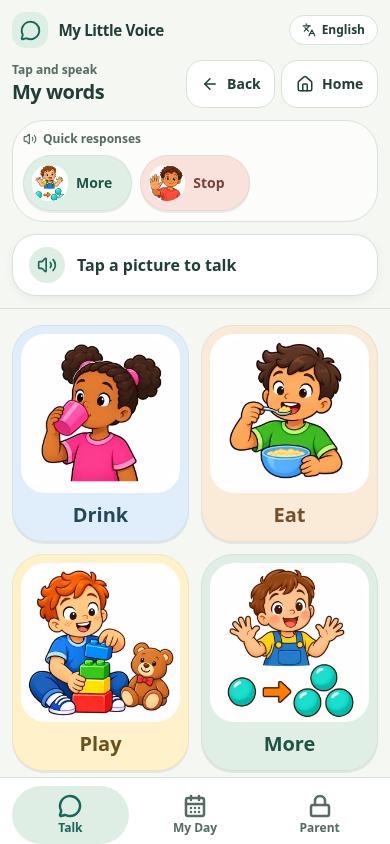
An English picture board in My Little Voice.
Start with something familiar
My Little Voice is an augmentative and alternative communication (AAC) app. Start with a few familiar pictures, then shape the boards around the person using them.
The library has 1,050 pictures, with clear illustrations designed to help young children recognise everyday objects, actions and needs.
Choose a picture and hear its word or message aloud. Picture-only mode keeps communication simple, with quick access to familiar choices.
Put favourite foods, people and activities together. Arrange the buttons in a familiar order and link boards so there is room for more.
Use pictures together in the phrase builder, or type with the built-in keyboard and speak the text aloud.
Use your own photos for family members, favourite toys or places. Record a voice for a button and choose wording that feels familiar.
Make a visual schedule for the day or a sequence of activities. Put the pictures in order to show a routine, a trip or the next few steps.
Save or share a backup containing your boards, photos and recordings. Restore it when you need your family’s content again.
Use the password-protected Parent area to choose pictures, edit messages and organise boards. Long-press buttons to edit or rearrange them. You can also manage voices and read the privacy policy offline.
On paper, too
Make an A4 visual schedule or print communication cards to cut out. Choose a picture-only layout or an ordered schedule, preview the pages, then print or save a PDF.
Use the same familiar pictures for a morning routine, a day out or a communication board on paper.
An example of a routine you could make. Printed schedules in the app use your selected pictures.
Words that feel like home
The interface language and communication language can be chosen separately. Extra voices can be downloaded through Google Play during setup or in Parent settings. Once ready, they work offline.
Version 23 · Closed testing · 33 languages
Help us try it out
My Little Voice is in Google Play’s closed testing. To get access, follow these three steps using the same Google account.
The Google Group gives your account access to the closed test.
Join the Google GroupOpen the testing page and select “Become a tester”.
Become a testerInstall My Little Voice from Google Play, then follow the setup in the app.
Open Google PlayPlease stay opted in for at least 14 days and try the app during that time. Feedback on the pictures, speech, navigation and any bugs is welcome. You can share private feedback through the app’s Google Play listing.
“I’m building My Little Voice for my nonverbal daughter. I wanted something we could use offline, with familiar pictures and our own words. It will stay free. If it helps other families too, that means a lot to me.”
You need a connection to install the app and download optional voices. After setup, communication and speech work offline. A connection is needed again for app updates or extra voice downloads.
The app has no account, ads or tracking. Family boards, photos and recordings are stored on your device. Google requires an account to join the test and install through Google Play.
Yes. Add personal photos, change the text on buttons and record your own audio. These are included when you create a family backup.
My Little Voice is an Android app. Open the Google Play listing on your device to check compatibility. Feedback from older and budget devices is especially helpful during testing.
The privacy policy is available on this website and offline in the app’s Parent area. Read the privacy policy.